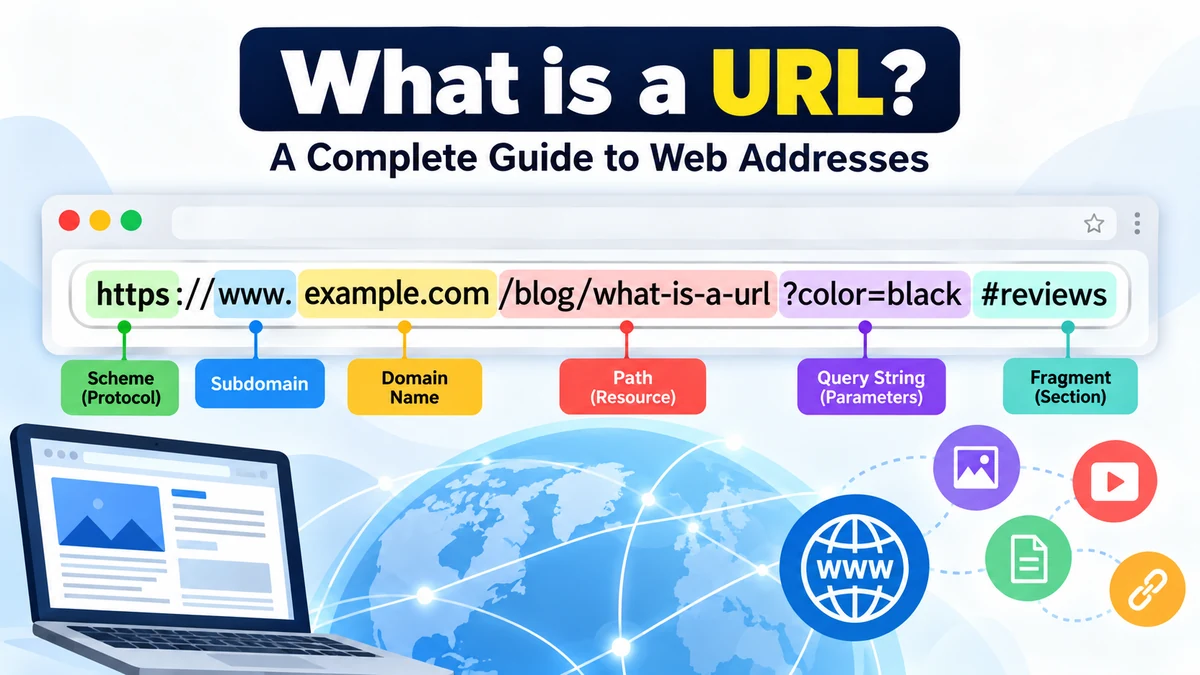
what is a url? Every time you open a website, click a search result, view an image, or share a webpage, a URL is working behind the scenes. It tells your browser where a resource is located and helps the browser determine how to access it.
A URL (Uniform Resource Locator) is the address used to locate a specific resource on the internet. That resource might be a webpage, image, video, CSS file, document, or another online resource. Web browsers use URLs as one of the fundamental mechanisms for retrieving published web resources.
For example:
https://www.example.com/blog/what-is-a-url
This URL identifies a particular page on the example.com website.
What Does URL Stand For?
URL stands for Uniform Resource Locator.
The simplest way to understand it is to think of a URL as a web address. Just as a physical address tells someone where to find a particular building, a URL gives software information needed to locate a resource on a network.
A URL can point to much more than a website’s homepage. URLs may identify individual webpages, images, videos, downloadable files, API resources, and other content.
The web’s addressing system has formal technical rules. RFC 3986 defines the generic URI syntax using components such as the scheme, authority, path, query, and fragment. Modern browser behavior is also defined by the WHATWG URL Living Standard.
What Is an Example of a URL?
Consider this example:
https://shop.example.com:443/products/shoes?color=black#reviews
At first glance, it looks like one long address. In reality, it contains several components:
| URL Part | Example | Purpose |
|---|---|---|
| Scheme | https | Specifies how the resource should be accessed |
| Subdomain | shop | Identifies a subsection or host |
| Domain | example.com | Identifies the website or host |
| Port | 443 | Identifies a network service |
| Path | /products/shoes | Points toward a particular resource |
| Query | ?color=black | Supplies additional parameters |
| Fragment | #reviews | Points to a particular section or state |
Not every URL contains all of these components. A simple URL might be only:
https://example.com
A more complex URL can contain a path, parameters, a fragment, or other information.
Parts of a URL Explained
Understanding the anatomy of a URL makes web addresses much easier to read.
The generic URI syntax described in RFC 3986 consists of a hierarchical sequence of scheme, authority, path, query, and fragment components. In everyday web usage, these are often discussed using more familiar terms such as protocol, domain, path, query string, and anchor.
1. Scheme or Protocol
The scheme appears at the beginning:
https://example.com
Here, https is the scheme.
It tells the browser what mechanism should be used to access the resource. For websites, the schemes people encounter most often are:
https— commonly used for encrypted web connectionshttp— the older, non-encrypted HTTP form
Other schemes also exist. For example, mailto: can be used to initiate an email action.
Technically, people often call https the “protocol” portion of a web address, although scheme is the more precise URL terminology.
2. Subdomain
Look at:
https://blog.example.com
Here, blog is a subdomain.
A subdomain can be used to organize different services or sections under a domain. Common examples include:
blog.example.com
support.example.com
shop.example.com
www.example.com
The familiar www is therefore not the domain itself. It is a hostname label commonly used as a subdomain.
3. Domain Name
In:
https://www.example.com
the recognizable domain is:
example.com
A domain name provides a human-readable name associated with an internet host. It saves users from having to remember numerical IP addresses.
The domain can itself be understood in parts. In example.com, example is the second-level domain and .com is the top-level domain, or TLD.
Other TLDs include .org, .net, .edu, .uk, and many others.
4. Port
A URL can explicitly specify a port:
https://example.com:443/page
Here, 443 is the port.
Ports identify network services on a host. They are often invisible in normal browsing because standard schemes have default ports. HTTPS normally uses port 443, while HTTP normally uses port 80, so browsers generally do not need those default values written in ordinary web URLs.
5. Path
Consider:
https://example.com/blog/url-guide
The path is:
/blog/url-guide
A path helps identify a resource within the scope of the host. Paths are usually organized hierarchically and can reflect a site’s content structure.
For example:
/products/laptops
might lead to a laptop category, while:
/products/laptops/model-123
could identify a particular product page.
Modern URLs do not necessarily correspond directly to physical folders or files stored on a server. Web applications can generate resources dynamically while still presenting clean hierarchical paths.
6. Query String and Parameters
A question mark often signals the beginning of a query:
https://example.com/search?q=laptop&page=2
Everything following ? belongs to the query component.
In this example, the query contains information such as:
q=laptop
and:
page=2
Multiple parameters are commonly separated with an ampersand (&).
Websites can use query parameters for searches, filters, sorting, pagination, tracking, and many other application-specific purposes.
7. Fragment
A fragment starts with #:
https://example.com/guide#security
Here:
#security
is the fragment.
Fragments commonly identify a specific part of a resource. On a long article, for example, clicking a table-of-contents link may take you directly to one heading.
An important technical detail is that the fragment is normally processed by the client, such as the browser, rather than being sent to the server as part of the resource request.
How Does a URL Work?
When you enter a web URL into a browser, several processes can occur in a fraction of a second.
Suppose you enter:
https://example.com/articles/url
The process can be simplified into these steps:
- The browser parses the URL. It identifies components such as the scheme, hostname, path, and any query or fragment.
- The hostname is resolved. DNS can translate the human-readable hostname into an IP address the network can use.
- A connection is established. For an HTTPS website, the browser establishes a secure connection with the appropriate server.
- The browser requests the resource. The path and other relevant request information help identify what is being requested.
- The server responds. It may return HTML, an image, JSON data, a redirect, an error, or another response.
- The browser processes the response. For a webpage, it may then request additional resources such as stylesheets, JavaScript, fonts, and images.
- A fragment is handled locally when applicable. The browser may jump to the corresponding section after loading the resource.
This is why a URL is more than a website name. It can contain both the location of a host and additional information describing a particular resource or request.
URL vs. Domain Name
A URL and a domain name are related, but they are not the same thing.
Consider:
https://www.example.com/blog/url-guide?source=search#parts
The domain is:
example.com
The complete URL is:
https://www.example.com/blog/url-guide?source=search#parts
A domain name identifies a named internet location or host context, while a URL can specify a complete address for a particular resource, including the scheme, host, path, query, and fragment.
A single domain can therefore have thousands or millions of different URLs.
For example:
https://example.com
https://example.com/about
https://example.com/contact
https://example.com/images/logo.png
These are separate URLs associated with the same domain.
URL vs. Link
People often use “URL” and “link” interchangeably, but there is a useful distinction.
A URL is an address:
https://example.com/help
A hyperlink is a clickable element that can reference that address.
For example, the visible words Help Center could be linked to the URL above. The reader sees clickable text rather than necessarily seeing the complete address.
In everyday conversation, calling a URL a “link” is common and usually understood. Technically, however, the URL is the address or reference used by the link.
URL vs. URI
URL and URI are another pair of terms that can cause confusion.
URI means Uniform Resource Identifier. RFC 3986 describes a URI as a compact sequence of characters used to identify an abstract or physical resource. Its generic syntax includes scheme, authority, path, query, and fragment components.
Historically and technically, URLs have often been described within the broader URI framework.
For everyday web development, however, the terminology has evolved. The current WHATWG URL Standard deliberately standardizes around the term URL for modern browser implementations and defines URL parsing, domains, IP addresses, encoding, and the JavaScript URL API.
For most ordinary users, knowing the distinction is less important than understanding that a URL is the web address they see, copy, share, and open.
Absolute URLs vs. Relative URLs
URLs can also be described as absolute or relative references.
Absolute URL
An absolute URL gives the complete address:
https://example.com/images/photo.jpg
It includes enough information to identify the resource independently of the current page.
Absolute URLs are useful when linking between different websites or when a resource must have an unambiguous full address.
Relative URL
A relative reference depends on a base URL.
For example:
/images/photo.jpg
If this appears on https://example.com, the browser can resolve it against the site’s base address.
Another example is:
../images/photo.jpg
Relative references are particularly common inside websites because developers can reference resources without repeatedly writing the full origin.
What Types of Resources Can URLs Point To?
A common misconception is that URLs only point to webpages.
They can identify many kinds of resources, including:
- HTML webpages
- Images
- Videos
- Audio files
- PDF documents
- CSS stylesheets
- JavaScript files
- Downloadable files
- API endpoints
- Search results
- Dynamically generated resources
MDN describes a URL as the address of a unique internet resource and notes examples such as HTML pages, CSS documents, and images.
This explains why opening an image in a new browser tab often produces its own URL. The image itself is an addressable web resource.
What Is HTTPS in a URL?
When you see:
https://
at the beginning of a URL, the resource is being accessed using HTTPS.
HTTPS is HTTP used over an encrypted connection. Encryption helps protect information traveling between the browser and server against interception or modification while in transit.
However, HTTPS should not be treated as proof that the website itself is trustworthy.
A fraudulent or malicious website can also use HTTPS. The padlock or HTTPS indicator tells you about the security of the connection, not the honesty of the organization operating the site.
When evaluating an unfamiliar URL, inspect the hostname carefully rather than relying only on the presence of HTTPS.
What Makes a URL Safe or Suspicious?
URLs are also an important part of online security.
Before clicking an unfamiliar link, pay particular attention to its hostname.
For example:
https://accounts.example.com/login
and:
https://example-login-security.com/accounts
may look related at a glance, but they belong to different domains.
Common warning signs include:
- Misspelled brand or domain names
- Unexpected domains
- Misleading subdomains
- Strange or unnecessary redirects
- Links received in suspicious messages
- URLs designed to hide their real destination
- Requests for passwords or financial information on an unexpected domain
A long URL is not automatically dangerous, and a short URL is not automatically safe. What matters is where it actually leads and whether you trust the destination.
Why Do Some URLs Contain Strange Characters?
URLs sometimes contain sequences such as:
%20
or:
%E2%9C%93
URLs follow specific parsing and encoding rules. Characters that cannot or should not appear literally in a particular component may be percent-encoded.
For example, a space is commonly represented as:
%20
So:
my document.pdf
could appear in a URL as:
my%20document.pdf
The WHATWG URL Standard defines contemporary browser URL parsing and serialization behavior, including handling of encoding and other edge cases.
Users normally do not need to encode URLs manually because browsers and applications handle much of this automatically.
Why Are URLs Important for Websites and SEO?
URLs primarily exist to identify and locate resources, but their structure can also affect usability and website management.
Compare these two examples:
https://example.com/products/wireless-headphones
and:
https://example.com/index.php?id=74829&cat=14
Both could technically lead to useful pages, but the first gives a human reader much more context about the destination.
Clear URLs can help users understand where a link is likely to take them. They can also make site structures easier for publishers and developers to manage.
For content-focused websites, sensible practices usually include:
- Keeping paths descriptive and concise
- Using words that accurately represent the page
- Avoiding unnecessary parameters when possible
- Maintaining a consistent URL structure
- Avoiding frequent URL changes
- Redirecting old URLs properly when resources move
- Preventing multiple unnecessary URLs from representing the same content
The goal should not be to force keywords into every URL. A useful URL is primarily stable, understandable, and accurately associated with its resource.
Can a URL Change?
Yes.
Website owners may change URLs when they restructure a site, rename content, migrate domains, or change their content management system.
For example:
Old URL:
https://example.com/post?id=55
New URL:
https://example.com/guides/url-basics
Changing an established URL carelessly can create problems because bookmarks, external links, search results, and internal links may continue pointing to the old address.
Websites commonly use HTTP redirects when a resource has permanently moved. This sends visitors and software from the old URL to the new destination.
URLs can also stop working completely if a resource is deleted or moved without an appropriate redirect. A valid-looking URL therefore does not guarantee that the resource still exists. MDN specifically notes that URLs may point to resources that have moved or no longer exist.
How Do You Find the URL of a Webpage?
For most desktop browsers, the current page’s URL appears in the address bar near the top of the browser window.
You can usually:
- Click the address bar.
- Select or reveal the full address.
- Copy it.
- Paste it into a message, document, or another browser tab.
Mobile browsers may shorten or visually simplify the displayed address, so tapping the address bar can reveal more of the URL.
Remember that browsers sometimes hide parts of an address in their normal interface. The visually displayed text is not always identical to the complete serialized URL.
Common URL Mistakes
URLs are simple to use, but a few mistakes cause frequent confusion.
Confusing the Domain With the Full URL
example.com is not the same as:
https://example.com/products/item
The latter provides a more complete address to a particular resource.
Assuming www Is Required
A website may use:
www.example.com
or:
example.com
Neither format is universally required. Website owners configure which hostname they want to use and may redirect one version to the other.
Treating Every Long URL as Suspicious
Search pages, online stores, analytics systems, and web applications can legitimately generate long query strings. Length alone does not establish whether a URL is malicious.
Assuming HTTPS Means a Website Is Legitimate
HTTPS protects the connection. It does not independently verify every claim made by the website.
Breaking a URL When Copying It
Missing even one important character can change the destination or make an address invalid. Query parameters and fragments can also contain meaningful information, so removing them may change what the recipient sees.
How to Read a URL Quickly
When you encounter an unfamiliar address, read it from the beginning but focus especially on the hostname.
Take:
https://support.example.com/account/reset?lang=en#instructions
You can interpret it as:
Scheme: https
Host: support.example.com
Domain: example.com
Path: /account/reset
Query: ?lang=en
Fragment: #instructions
Once you learn these components, even complicated web addresses become much easier to understand.
Why URLs Matter to the Web
URLs solve a fundamental problem: resources on a global network need consistent identifiers and addresses that software can interpret.
They make it possible to bookmark a page, embed an image, cite an online document, send someone a specific article, request data from an API, or jump directly to a section of a webpage.
The standards behind these addresses have evolved over decades. RFC 3986 remains an important specification for generic URI syntax, while the WHATWG URL Living Standard defines URL behavior intended to match modern browser implementations.
Final Takeaway: what is a url?
So, what is a url? A URL, or Uniform Resource Locator, is an address used to locate a resource on the internet. It can tell software how to access a resource, which host is involved, which path identifies it, and, when present, what query information or fragment should be used.
The easiest way to understand any URL is to break it into its components: scheme, host or domain, optional port, path, query, and fragment. Once you recognize those pieces, web addresses stop looking like random strings of characters and become a readable map showing where an online resource lives and how it should be accessed.