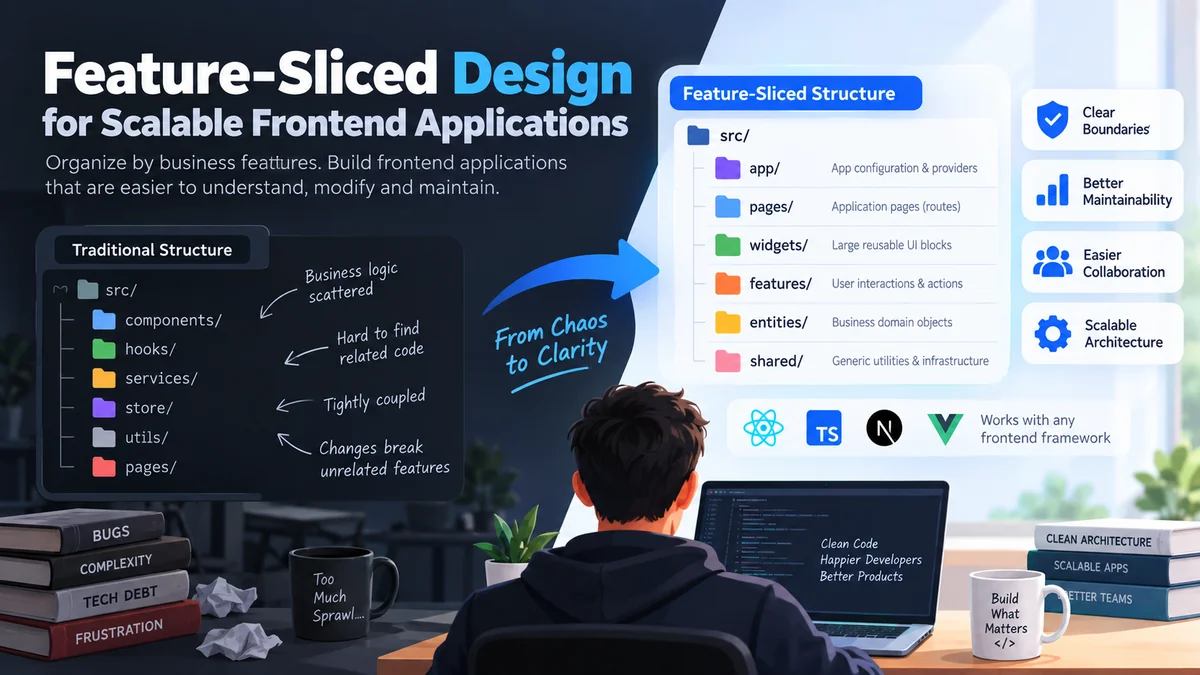
Frontend applications rarely become hard to maintain because of one badly written component. Problems usually appear gradually: business logic spreads across folders, API calls become tightly coupled to UI components, reusable code becomes difficult to identify, and changing one feature unexpectedly breaks another.
feature sliced commonly refers to Feature-Sliced Design (FSD), a frontend architectural methodology that organizes application code into standardized layers, business-focused slices, and technical segments. Its main goal is to make growing applications easier to understand, modify, test, and maintain by controlling dependencies and keeping related code together.
Feature-Sliced Design is often discussed in connection with React and TypeScript projects, but it is not tied to a particular framework. The methodology can be applied to web or native frontend applications where clear module boundaries become valuable as the product grows.
This guide explains how feature sliced architecture works, what layers and slices actually mean, how dependencies are controlled, and when adopting FSD makes sense.
What Is feature sliced Architecture?
feature sliced architecture organizes code according to three main levels:
- Layers describe how much responsibility or influence a module has.
- Slices group code around a business concept or application domain.
- Segments organize code inside a slice according to technical purpose.
Instead of creating one enormous components folder, another folder containing every hook, and another containing every API service, FSD tries to keep code close to the business functionality that uses it.
For example, imagine an online marketplace.
A conventional project might eventually look like this:
src/
├── components/
├── hooks/
├── services/
├── store/
├── utils/
└── pages/
That layout looks simple at first.
As the project grows, however, a developer searching for everything related to a shopping cart may need to inspect five different directories.
A feature-oriented structure can make that relationship clearer:
src/
├── app/
├── pages/
├── widgets/
├── features/
├── entities/
└── shared/
Business areas are then divided into slices such as:
features/
├── add-to-cart/
├── remove-from-cart/
└── apply-coupon/
The structure communicates what the application actually does rather than merely describing what kind of files it contains.
The Core Idea Behind FSD
Feature-Sliced Design attempts to increase cohesion while limiting unnecessary coupling.
High cohesion means closely related code stays together.
Low coupling means unrelated areas do not depend heavily on each other’s internal implementation.
A good feature sliced structure therefore makes questions such as these easier to answer:
- Where does this business logic belong?
- Which modules are allowed to use it?
- Can this feature be changed without affecting unrelated code?
- Which part of a module is public?
- Where should reusable functionality live?
Those boundaries are more important than the folder names themselves.
feature sliced Layers Explained
Layers are the highest organizational level in FSD.
The current Feature-Sliced Design documentation describes these standardized layers:
| Layer | Typical Responsibility |
|---|---|
app | Application-wide configuration and initialization |
pages | Complete application pages or routes |
widgets | Large reusable UI blocks |
features | User-facing interactions and actions |
entities | Business-domain objects |
shared | Generic reusable infrastructure and utilities |
The older processes layer exists in historical FSD structures but is now deprecated. Projects are also not required to use every available layer. The official documentation notes that many applications can work with only the layers they actually need.
App Layer
The app layer contains things that affect the application globally.
Typical examples include:
app/
├── providers/
├── router/
├── styles/
└── config/
You might place application initialization, global providers, routing configuration, dependency injection, or top-level styles here.
Because app sits at the top of the architecture, it can compose functionality from lower layers.
Pages Layer
The pages layer represents screens or routes.
Examples might include:
pages/
├── home/
├── product/
├── checkout/
├── profile/
└── settings/
A useful principle is that pages should represent meaningful application screens rather than simply becoming containers for random components.
Modern FSD guidance places particular emphasis on a pages-first approach: code that is only needed by one page can often remain inside that page rather than being prematurely extracted into lower-level abstractions.
This helps prevent one of the biggest architectural mistakes in frontend development: abstracting code before there is a genuine reuse case.
Widgets Layer
Widgets are substantial UI sections that can combine lower-level entities and features.
Examples include:
widgets/
├── navigation-header/
├── product-gallery/
├── checkout-summary/
└── user-sidebar/
A widget might contain its own presentation logic, state, API interaction, or composition where appropriate.
A navigation header, for instance, could combine:
- user information
- authentication actions
- search
- notifications
- navigation links
Widgets are particularly useful when a large interface block is reused across pages or deserves a clear architectural boundary of its own.
Features Layer
The features layer represents meaningful user interactions.
Examples include:
features/
├── sign-in/
├── add-to-cart/
├── change-password/
├── submit-review/
└── follow-user/
Think in terms of verbs or user goals.
An entity might describe a product.
A feature might describe adding a product to the cart.
That distinction helps prevent the features layer from becoming a collection of arbitrary UI components.
Entities Layer
Entities represent recognizable business concepts.
For an ecommerce application:
entities/
├── product/
├── user/
├── order/
└── category/
For a social network:
entities/
├── user/
├── post/
├── comment/
└── message/
An entity slice may contain UI, API-related code, data models, validation schemas, or reusable logic associated with that business object.
One common mistake is creating an entity for every noun in the application. FSD works better when entities represent meaningful domain concepts rather than becoming a mechanical classification exercise.
Shared Layer
shared contains functionality that does not belong to a specific business domain.
Typical examples include:
shared/
├── api/
├── ui/
├── lib/
├── config/
└── assets/
You might place a generic button in shared/ui.
You would not normally place a product-specific purchase button there if it carries product business behavior.
That distinction matters.
The Shared layer should remain broadly reusable rather than becoming a dumping ground called utils under a different name.
How Slices Work in Feature-Sliced Design
Slices form the second organizational level.
Their purpose is to group modules according to their meaning within the product or business domain. Slice names therefore depend on the application rather than being standardized globally.
Consider a social platform:
entities/
├── user/
├── post/
└── comment/

features/
├── create-post/
├── like-post/
└── follow-user/
Each directory is a slice.
The benefit is locality.
Everything required for like-post can remain close together rather than being distributed between:
components/
hooks/
services/
reducers/
types/
utils/
Slices Should Be Highly Cohesive
A good slice has a clear purpose.
If someone asks:
“What does this folder represent?”
the answer should be obvious from the business domain.
For example:
features/change-avatar/is clearer than:
features/forms/The first describes application behavior.
The second describes an implementation category.
Slices Should Avoid Unnecessary Cross-Dependencies
Two slices on the same layer generally should not casually import each other’s internals.
If every feature depends on several other features, the architecture gradually becomes a dependency web.
That defeats much of the purpose of feature slicing.
When shared functionality genuinely belongs lower in the hierarchy, it can often be moved to an appropriate entity or shared module.
Segments: Organizing Code Inside a Slice
Segments are the third organizational level.
They describe the technical purpose of code inside a slice.
Common standardized segments include:
| Segment | Typical Content |
|---|---|
ui | Components, visual presentation and styles |
api | Requests, API functions and data mapping |
model | State, schemas, interfaces and business logic |
lib | Internal supporting libraries |
config | Configuration and feature flags |
These segment conventions are documented by Feature-Sliced Design, while custom segments may also be used when they communicate purpose clearly.
For example:
features/add-to-cart/
├── api/
│   └── add-item.ts
├── model/
│   └── use-add-to-cart.ts
├── ui/
│   └── add-to-cart-button.tsx
└── index.ts
This gives developers two pieces of information immediately:
Business meaning: add to cart.
Technical responsibility: UI, model, or API.
That is much more descriptive than navigating one global folder containing dozens of unrelated hooks or request functions.
Avoid Generic Segment Names
Directories such as:
components/
hooks/
types/
describe implementation details but provide little architectural meaning.
A segment called model, for example, can contain the state, domain types, schemas, and business logic necessary to represent the slice’s data behavior.
The goal is not to eliminate components or hooks. It is to avoid letting framework-specific implementation categories dictate the entire project architecture.
The feature sliced Import Rule
The import rule is one of the most important parts of the methodology.
In simplified terms:
A module may import from slices on layers below its own layer, but should not depend on slices from higher layers.
The standardized order can be visualized as:
app
 ↓
pages
 ↓
widgets
 ↓
features
 ↓
entities
 ↓
shared
For example:
features/add-to-cartcan use:
entities/product
shared/api
shared/ui
But an entity should not import a feature:
entities/product
    ❌ imports features/add-to-cart
The official documentation defines this as the layer import rule and explains that a slice may depend on slices located strictly below it.
Why This Dependency Direction Matters
Without dependency rules, a frontend codebase can slowly develop circular architectural relationships:
product → cart → checkout → productEach folder becomes difficult to change independently.
A one-directional hierarchy provides predictable dependency flow.
That means developers can inspect a module and reason about the areas it is allowed to depend on before even opening the files.
Same-Layer Imports Need Care
Slices on the same layer are normally intended to remain isolated.
Consider:
features/add-to-cart/
features/apply-coupon/
If add-to-cart directly relies on private files inside apply-coupon, the two features become coupled.
Often the better solution is to:
- compose them at a higher layer,
- extract genuinely shared domain behavior,
- or reconsider whether they should actually be separate architectural units.
This is where FSD provides value beyond simple folder organization.
It defines relationships between modules.
Public APIs in feature sliced Projects
A public API defines what a slice exposes to the rest of the application.
Instead of importing directly from internal files:
import { AddToCartButton }
  from "@/features/add-to-cart/ui/AddToCartButton";
a consumer can import from the slice boundary:
import { AddToCartButton }
  from "@/features/add-to-cart";
The slice may define:
// features/add-to-cart/index.ts

export { AddToCartButton } from "./ui/AddToCartButton";
The official Feature-Sliced Design documentation describes this public API as a contract between a group of modules and its consumers. External modules should rely on the exposed interface rather than knowing the slice’s internal directory structure.
Why Public APIs Help
Suppose you reorganize this:
ui/AddToCartButton.tsxinto:
ui/buttons/AddToCartButton.tsxIf outside modules import the internal path directly, dozens of files could require changes.
With a stable index.ts public API, outside consumers may require no modification.
That gives developers freedom to refactor the inside of a slice without unnecessarily changing its consumers.
Do Not Export Everything Automatically
This looks convenient:
export * from "./ui";
export * from "./model";
export * from "./api";
but it can expose implementation details that were never intended to become part of the module contract.
A better public API exposes deliberately selected functionality:
export { AddToCartButton } from "./ui/AddToCartButton";
export { useAddToCart } from "./model/useAddToCart";
The result is a smaller and clearer interface.
Barrel Files Have Tradeoffs
Public APIs are frequently represented using index.ts or index.js, sometimes called barrel files.
They are useful, but they are not automatically harmless.
The official documentation warns that poorly designed index files can contribute to:
- circular imports,
- unnecessarily large bundles,
- tree-shaking problems,
- accidental access to internal modules,
- slower bundler behavior in large projects.
For collections such as shared/ui, separate public entry points can sometimes be cleaner:
shared/ui/button/index.ts
shared/ui/modal/index.ts
shared/ui/input/index.ts
Then imports remain explicit:
import { Button } from "@/shared/ui/button";A Practical feature sliced React Example
Imagine a simple ecommerce frontend built with React and TypeScript.
A reasonable structure could look like this:
src/
├── app/
│   ├── providers/
│   ├── router/
│   └── styles/
│
├── pages/
│   ├── home/
│   ├── product/
│   └── cart/
│
├── widgets/
│   ├── header/
│   ├── product-list/
│   └── cart-summary/
│
├── features/
│   ├── add-to-cart/
│   ├── remove-from-cart/
│   └── search-products/
│
├── entities/
│   ├── product/
│   ├── cart/
│   └── user/
│
└── shared/
    ├── api/
    ├── ui/
    ├── lib/
    └── config/
Now consider a product page.
The page could compose:
Product entity
+ Add-to-cart feature
+ Product gallery widget
+ Shared UI components
The architecture mirrors application behavior.
Where Should API Requests Go?
There is no rule saying every API request must exist in one global API directory.
Placement depends on responsibility.
A generic API client can live in:
shared/api/client.tsA request used only by one feature may stay inside:
features/add-to-cart/api/A request tightly connected to reusable entity data might belong inside:
entities/product/api/FSD documentation explicitly recommends keeping a request inside a slice’s api segment when that request is specific to the slice and not reused elsewhere.
That keeps ownership clear.
Feature-Sliced Design With React, Next.js, and TypeScript
FSD is sometimes described as a React architecture, but the methodology itself is framework-independent.
React
React applications fit naturally with FSD because components can be grouped around business responsibility rather than simply being placed into one global components directory.
Features may combine:
- React components
- hooks
- state management
- API requests
- validation
- business rules
without losing their domain context.
TypeScript
TypeScript strengthens architectural boundaries because public APIs can deliberately expose:
- interfaces,
- types,
- schemas,
- functions,
- components.
For example:
export type { Product } from "./model/types";
export { ProductCard } from "./ui/ProductCard";
Consumers know exactly which contracts are supported.
Next.js
Next.js requires more thought because its routing conventions already impose structural rules.
The safest approach is usually to respect framework-level routing requirements while using FSD for business modules around them rather than forcing the framework to fit an architecture it was not designed for.
Public APIs may also need to respect server/client environment boundaries. Current FSD documentation recognizes environment-specific public API considerations for frameworks where bundling server and client code together can cause problems.
The architecture should support the framework, not fight it.
Pages-First Feature-Sliced Design
One especially useful modern FSD principle is pages-first decomposition.
Older architectural habits often encourage developers to immediately ask:
“Can I extract this into a feature?”
Modern FSD guidance encourages a more conservative question:
“Does this code actually need to be reused outside this page?”
If the answer is no, keeping the code in the page may be perfectly reasonable. Version 2.1 of the methodology emphasized this pages-first direction.
Suppose a complicated form appears only on:
pages/account-settings/There is no automatic need to create:
features/account-settings-form/Keeping it local avoids artificial fragmentation.
If another screen later requires the same behavior, that is a stronger signal that extraction may be worthwhile.
Why This Matters
Over-engineering can be as harmful as under-engineering.
Too many tiny slices create:
- excessive navigation,
- unclear ownership,
- unnecessary public APIs,
- artificial abstractions,
- longer onboarding time.
A good architecture introduces a boundary because the boundary solves a real problem.
Benefits of feature sliced Architecture
Feature-Sliced Design is attractive because it attempts to make the structure of the codebase reflect the structure of the product.
Clearer Ownership
A developer working on checkout can quickly identify:
pages/checkout
widgets/checkout-summary
features/apply-coupon
entities/order
instead of searching every technical folder in the project.
Predictable Dependencies
The layer import rule gives the team a shared answer to:
“Can this module depend on that one?”
That eliminates many architecture debates.
Easier Refactoring
Public APIs hide internal implementation details.
A slice can often change internally while leaving consumers untouched.
Better Scalability
As new features are added, they can receive their own bounded space instead of adding another twenty files to global components, hooks, and services folders.
Improved Team Collaboration
Business-oriented names help developers communicate about the same domain concepts.
A developer can say:
“The issue is inside the checkout feature.”
That can be more useful than:
“The issue is somewhere in hooks and services.”
Gradual Adoption
FSD does not have to be introduced through a complete rewrite.
The official documentation supports incremental adoption, which is particularly useful for established projects.
Disadvantages and Tradeoffs
Feature-Sliced Design is not automatically the best architecture for every frontend project.
More Structure to Learn
Developers must understand concepts such as:
- layers,
- slices,
- segments,
- import rules,
- public APIs,
- cross-import limitations.
For a tiny application, that learning cost may outweigh the benefit.
Classification Can Become Subjective
Teams sometimes spend too much time debating:
“Is this an entity, feature, or widget?”
Architectural judgment still matters.
FSD provides conventions, not an algorithm that decides every folder automatically.
Over-Slicing Creates Complexity
Breaking every interaction into its own feature can leave developers navigating a huge number of tiny directories.
The pages-first approach exists partly to reduce this problem.
Public APIs Require Discipline
An index.ts file does not technically stop somebody from deep-importing internal modules.
Teams may need linting or architectural validation to enforce boundaries consistently.
Steiger and FSD Architecture Validation
Folder conventions become less useful when nothing prevents violations.
The FSD ecosystem includes Steiger, an architectural linter designed to check project structures and detect violations of Feature-Sliced Design rules. The official FSD site presents Steiger as a way to turn architectural conventions into automated checks.
This can be particularly useful for larger teams.
Instead of relying on code-review comments such as:
“Please don’t import another feature here.”
the rule can be checked automatically.
FSD also maintains tooling such as a command-line utility for generating standardized layers, slices, and segments.
Tooling does not make the architecture good by itself, but it can reduce accidental inconsistency.
Cross-Imports and the @x Pattern
Real business domains sometimes contain relationships that do not fit perfectly into strict slice isolation.
For example:
entities/user
entities/team
A team might reference users, while user-related code may also need team types.
For certain relationships in the Entities layer, Feature-Sliced Design provides the @x public API convention.
A simplified structure might be:
entities/
├── user/
│   ├── @x/
│   │   └── team.ts
│   └── index.ts
└── team/
The dedicated cross-reference makes the architectural relationship explicit instead of hiding it through arbitrary deep imports.
The official documentation recommends keeping such cross-imports limited and primarily using this approach where entity relationships make them difficult to avoid.
That distinction is important.
@x should solve legitimate domain coupling.
It should not become an escape hatch whenever the normal architecture feels inconvenient.
Common feature sliced Mistakes
Most unsuccessful FSD implementations fail because teams reproduce their old architecture using new folder names.
1. Turning Shared Into Another Utils Folder
Bad:
shared/
├── helpers/
├── random/
├── misc/
└── everything/
Better:
shared/
├── api/
├── ui/
├── lib/
└── config/
Every module should have a recognizable responsibility.
2. Creating Too Many Features
Not every button click deserves a feature slice.
Ask whether the behavior represents a meaningful user interaction and whether extracting it improves architectural clarity.
3. Extracting Reusable Code Too Early
Two pieces of code looking similar today does not mean they will evolve together.
Sometimes duplication is safer than introducing a shared dependency too early.
The official FSD migration guidance even acknowledges cases where duplication can be architecturally preferable when supposedly shared pieces are likely to diverge.
4. Deep-Importing Slice Internals
Avoid:
import { something }
  from "@/features/payment/model/internal/something";
Prefer the public API:
import { something } from "@/features/payment";5. Ignoring Dependency Direction
Folders alone do not create architecture.
If entities routinely import features, and features freely import one another, the project may look like FSD without receiving its main architectural benefits.
6. Treating FSD as a Framework Requirement
FSD is an architectural methodology.
React, Vue, Next.js, Nuxt, state managers, query libraries, and UI libraries remain separate concerns.
You can use the ideas that improve your project without turning every convention into ceremony.
How to Migrate an Existing Project to feature sliced
Reorganizing a mature frontend should usually happen incrementally.
Moving every file in one massive refactor creates unnecessary risk.
Step 1: Establish App, Pages, and Shared
Start with obvious boundaries:
app/
pages/
shared/
These are often easier to identify than fine-grained entities and features.
Step 2: Organize Pages Around Routes
Instead of:
pages/
├── HomePage.tsx
├── ProductPage.tsx
├── CartPage.tsx
you can gradually move toward:
pages/
├── home/
├── product/
└── cart/
Then keep page-specific code nearby.
Step 3: Eliminate Page-to-Page Dependencies
If one page imports an internal component from another page, investigate why.
Possible solutions include:
- duplicate simple page-specific code,
- move generic UI into
shared/ui, - move reusable domain behavior into an appropriate entity,
- extract a genuine reusable feature.
The official migration guide specifically calls out cross-imports between pages as an early problem to resolve.
Step 4: Extract Genuine Entities
Look for stable business concepts:
user
product
order
article
comment
Do not extract every possible noun.
Choose concepts that actually help organize reusable domain code.
Step 5: Extract Reusable User Features
Look for actions appearing across different parts of the application:
sign-in
add-to-cart
follow-user
change-theme
If something remains unique to one page, leaving it there may still be cleaner.
Step 6: Introduce Public APIs
Add explicit slice entry points and update consumers gradually.
This is a good opportunity to identify which internals were unintentionally exposed.
Step 7: Enforce Architectural Rules
Once the desired structure is stable, linting tools can help prevent new violations.
The key is sequencing.
First establish an architecture that fits the application.
Then automate its rules.
feature sliced vs Traditional Folder Structures
The practical difference becomes clearer when the approaches are compared directly.
| Traditional Type-Based Structure | Feature-Sliced Structure |
|---|---|
| Groups by file type | Groups by product responsibility |
| Global components folder | UI stays near its domain |
| Global hooks folder | Logic belongs to relevant slices |
| Dependencies often informal | Layer imports follow explicit direction |
| Reuse encouraged broadly | Reuse introduced where justified |
| Internal paths commonly imported | Public APIs define module boundaries |
| Simple for small apps | Stronger structure for growing apps |
Neither architecture is automatically superior.
A five-screen prototype may genuinely benefit from:
components/
hooks/
services/
A product maintained for years by several developers may benefit significantly from stronger boundaries.
Architecture should solve the complexity you actually have.
When Should You Use Feature-Sliced Design?
FSD is worth considering when:
- the frontend contains many business domains,
- developers struggle to find related code,
- features frequently affect unrelated modules,
- the application is expected to grow for years,
- multiple developers work on the same codebase,
- business requirements change frequently,
- dependency direction has become unclear,
- existing technical folders have grown excessively large.
It may be unnecessary when:
- the project is a short-lived prototype,
- the frontend has only a handful of screens,
- business logic is minimal,
- one developer can understand the entire codebase easily,
- adding architectural layers creates more friction than clarity.
A Simple Decision Test
Ask three questions:
- Can developers quickly locate everything related to one business capability?
- Can they explain which modules are allowed to depend on which others?
- Can a feature be refactored without unexpectedly affecting unrelated areas?
If the answer is repeatedly no, a structured approach such as FSD may solve a real problem.
If all three answers are already yes, reorganizing purely to follow an architectural trend may provide little value.
What Actually Makes feature sliced Work
The folder tree is the visible part of FSD, but it is not the most important part.
What actually makes the methodology useful is the combination of:
- business-oriented decomposition,
- controlled dependency direction,
- cohesive slices,
- intentional public APIs,
- limited coupling,
- practical rather than premature reuse.
A project can contain perfect-looking:
app/
pages/
widgets/
features/
entities/
shared/
folders and still be poorly architected.
Conversely, a team may use only some FSD principles and gain significant benefits.
The strongest implementations treat the methodology as a way to reason about change.
When a new requirement arrives, developers should know where it belongs, what it may depend on, and which parts of the system should remain unaffected.
That predictability is the real objective.
Final Thoughts on feature sliced
feature sliced architecture, better known as Feature-Sliced Design, gives frontend teams a structured way to organize growing applications around layers, business slices, technical segments, public APIs, and predictable dependency rules.
Its value is not in creating more folders. Its value is in making boundaries explicit.
For smaller projects, conventional organization may remain simpler. For larger React, TypeScript, Next.js, Vue, or other frontend applications, FSD can provide a useful framework for keeping business logic understandable as requirements and teams grow.
The best starting point is usually modest: organize clear pages, keep generic infrastructure in Shared, preserve page-specific code until reuse is real, and introduce entities or features only when they create a meaningful boundary. From there, public APIs and automated architectural checks can reinforce the structure without turning it into unnecessary ceremony.