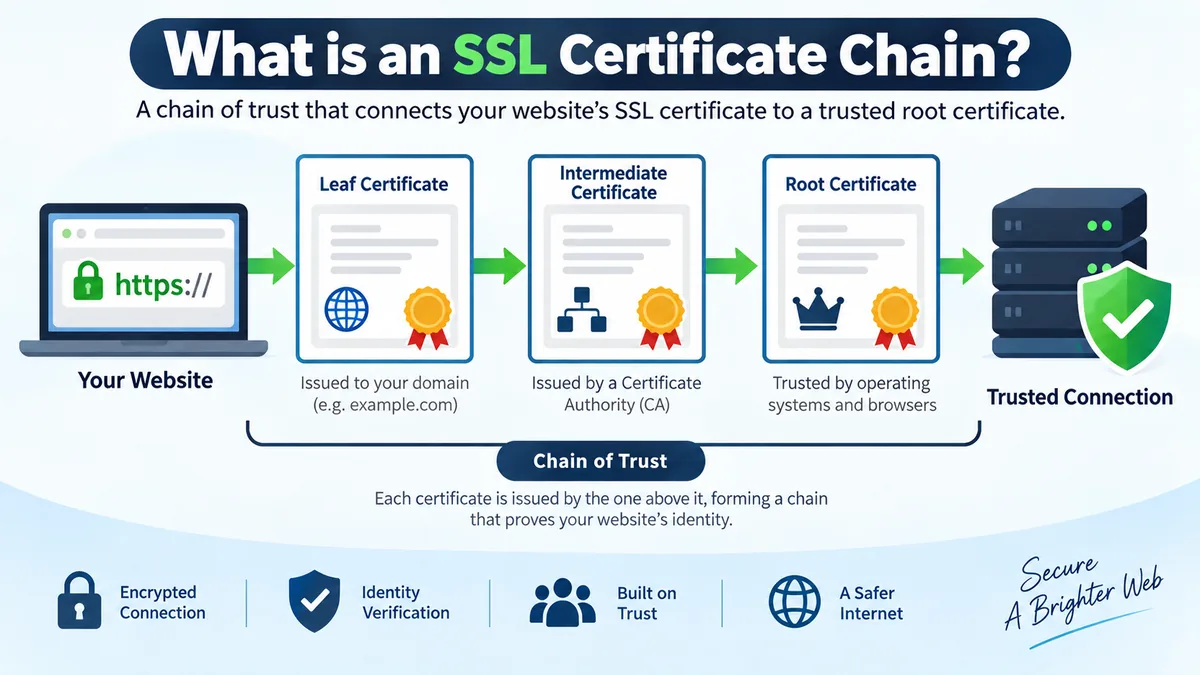
A website can have a valid SSL certificate and still produce a security warning. One common reason is that the certificate itself is fine, but the chain connecting it to a trusted Certificate Authority is incomplete or incorrectly configured.
If you are wondering what is an ssl certificate chain, it is an ordered sequence of digital certificates that connects a website’s SSL/TLS certificate to a trusted root Certificate Authority (CA). The chain usually contains a leaf or server certificate, one or more intermediate CA certificates, and a trusted root certificate. Each certificate helps establish a verifiable path of trust.
Although people still commonly say “SSL certificate,” modern HTTPS connections use TLS (Transport Layer Security). SSL is the older protocol family, while TLS provides the security used by today’s HTTPS connections.
What Is an SSL Certificate Chain and Why Is It Needed?
An SSL certificate is not trusted merely because a web server presents it.
Your browser needs a way to determine who issued that certificate and whether that issuer can ultimately be connected to a Certificate Authority the browser or operating system already trusts.
That verification path is the certificate chain, also known as the:
- Certificate chain of trust
- SSL/TLS certificate chain
- Certification path
- Trust chain
A basic chain looks like this:
Trusted Root CA
      ↓
Intermediate CA
      ↓
Website / Leaf Certificate
The website certificate identifies the server or domain. An intermediate CA certificate signs or issues that certificate, while the intermediate itself traces back to a trusted root CA. A chain can contain more than one intermediate certificate.
The important idea is simple: trust is established through a cryptographically verifiable path rather than by trusting an unknown website certificate directly.
A Simple Real-World Analogy
Imagine someone shows you an employee ID.
You do not personally know that employee, so the ID alone may not convince you. However, you recognize the organization that authorized the department that issued the ID.
The trust relationship becomes:
Trusted Organization
        ↓
Authorized Department
        ↓
Employee
A certificate chain works in a similar way:
Root CA
   ↓
Intermediate CA
   ↓
Server Certificate
Digital signatures provide the cryptographic proof connecting these certificates.
The Three Main Parts of an SSL Certificate Chain
Understanding what is an ssl certificate chain becomes much easier once you separate its three principal components.
| Certificate type | Purpose | Usually located |
|---|---|---|
| Root certificate | Acts as the trust anchor | Client trust store |
| Intermediate certificate | Connects the leaf certificate to a trusted root | Usually supplied by the server |
| Leaf certificate | Identifies the website or server | Web server |
1. Root Certificate
The root certificate sits at the top of the Public Key Infrastructure (PKI) hierarchy.
It belongs to a trusted root Certificate Authority and functions as a trust anchor. Root certificates are self-signed, meaning the certificate’s issuer is the same root CA represented by the certificate.
Operating systems, browsers, applications, and other TLS clients maintain trust stores containing root certificates they recognize.
This distinction matters because your website normally does not create trust by sending a root certificate and asking the browser to accept it. The client establishes trust because an appropriate root is already trusted locally.
Examples of organizations operating public certificate infrastructure include DigiCert and Sectigo. Different platforms maintain their own root programs and trust stores.
2. Intermediate Certificate
An intermediate certificate sits between the root CA and the website certificate.
For example:
Root CA
   ↓ signs
Intermediate CA
   ↓ signs
example.com
There can also be multiple intermediates:
Root CA
   ↓
Intermediate CA 1
   ↓
Intermediate CA 2
   ↓
example.com
Intermediate CAs provide separation between highly protected root keys and everyday certificate issuance.
Instead of routinely using a root CA’s private key to issue individual website certificates, Certificate Authorities can keep the root more tightly protected and use intermediate CAs for operational issuance.
This hierarchy limits exposure if an issuing CA key is ever compromised.
Intermediate certificates are especially important during server configuration. DigiCert notes that failing to install the necessary intermediate can prevent browsers, applications, and mobile devices from trusting the SSL/TLS certificate.
3. Leaf or Server Certificate
The bottom certificate is commonly called the:
- Leaf certificate
- Server certificate
- End-entity certificate
- SSL/TLS certificate
This is the certificate associated with the website or service the user is actually connecting to.
It contains information used during certificate validation, including the server identity and public key. Modern hostname validation normally relies on the certificate’s Subject Alternative Name (SAN) extension.
The leaf certificate is normally issued and digitally signed by an intermediate CA rather than directly by the root CA.
How Does an SSL Certificate Chain Work?
When you visit an HTTPS website, the browser and server perform a TLS handshake.
Certificate validation is one part of that process.
A simplified sequence looks like this:
- The browser connects to an HTTPS server.
- The server presents its leaf certificate and normally the required intermediate certificate or certificates.
- The client examines the certificate information.
- It attempts to construct a certification path toward a trusted root.
- Cryptographic signatures between certificates are verified.
- Certificate validity and other applicable validation rules are checked.
- The requested hostname is compared with the identity authorized by the certificate.
- If a valid path reaches an acceptable trust anchor and the other checks succeed, certificate authentication can succeed.
The process happens quickly enough that users normally never notice it.
How Digital Signatures Connect the Chain
Suppose the chain is:
Root CA
   ↓
Intermediate CA
   ↓
www.example.com
The intermediate CA signs the website certificate using its private key. A client can use the intermediate certificate’s public key to verify that signature.
The root CA similarly signs the intermediate certificate.
The client can therefore validate a sequence of signatures leading toward a root it already trusts.
IBM describes another useful diagnostic relationship: for certificates below the root, the issuer of one certificate should correspond to the subject of its issuer certificate in the chain.
What Does the Server Actually Send?
This is one of the most frequently misunderstood parts of certificate chains.
A properly configured TLS server normally sends:
Leaf certificate
Intermediate certificate(s)
The trusted root generally does not need to be sent by the server because the client is expected to obtain its trust anchor from its own trust store.
This distinction explains why simply having all the certificates somewhere on the server is not enough. The TLS service needs to present the appropriate chain to connecting clients.
Some software packages these certificates into files with names such as:
cert.pem
chain.pem
fullchain.pem
Exact filenames and contents depend on the software or certificate provider.
A full chain file commonly combines the leaf certificate with the necessary intermediate certificate or certificates. However, administrators should check the requirements of the specific web server or application rather than assuming every product uses identical file conventions.
What Is an Intermediate SSL Certificate and Why Does It Matter?
The intermediate certificate is the bridge between your website and the root of trust.
Consider a client that receives only:
www.example.comIf it cannot discover an issuer path from that certificate to a trusted root, certificate validation can fail.
Now consider the server providing:
www.example.com
      ↓
Intermediate CA
The client can use the intermediate to continue building a path toward a root in its trust store.
This is why an incomplete certificate chain may cause a site to work on one device but fail on another. Some clients may already possess or retrieve a needed intermediate, while others may not. Servers should therefore be configured to provide the required intermediates rather than relying on client behavior.
What Is a Certificate Authority?
A Certificate Authority (CA) is an organization or system that issues and manages digital certificates.
Within PKI, certificates associate identities with public keys. Certificate Authorities use digital signatures to establish relationships between certificates.
A public TLS hierarchy commonly looks like this:
Root Certificate Authority
          ↓
Intermediate Certificate Authority
          ↓
End-Entity / Website Certificate
The CA does not encrypt every HTTPS connection itself.
Instead, its role in this context is to provide authenticated certificate issuance and a chain that clients can validate. The TLS protocol then uses cryptographic mechanisms to establish the secure connection between client and server.
Root Certificate vs Intermediate Certificate vs Leaf Certificate
These certificates are related, but they perform different jobs.
| Feature | Root certificate | Intermediate certificate | Leaf certificate |
|---|---|---|---|
| Position | Top | Middle | Bottom |
| Primary role | Trust anchor | Delegates/connects trust | Identifies end entity |
| Signed by | Usually itself | Root or another intermediate | Intermediate CA |
| Commonly sent by website | Usually no | Yes | Yes |
| Stored in client trust store | Commonly | Sometimes/can be cached | Not as a trust anchor |
| Associated with website hostname | No | No | Yes |
| Exposure sensitivity of issuing key | Extremely high | High | Private key belongs to end entity |
The root establishes the trusted endpoint of the certification path, while intermediates create a safer and more manageable issuing hierarchy.
What Is an Incomplete SSL Certificate Chain?
An incomplete certificate chain occurs when a client cannot build the required certification path from the server certificate to an acceptable trust anchor.
One common cause is a missing intermediate certificate.
For example, suppose the correct path is:
Root CA
   ↓
Intermediate A
   ↓
Intermediate B
   ↓
Website Certificate
But the server presents only:
Website Certificate
Intermediate B
If the client cannot obtain Intermediate A through another supported mechanism, it may be unable to complete the path.
Sectigo documents missing intermediates as a cause of untrusted or unknown issuer warnings.
Common Symptoms of a Broken Chain
Depending on the client and configuration, problems can appear as:
- Certificate verification failures
- Unknown issuer messages
- Untrusted certificate warnings
- HTTPS connection failures
- API or command-line client errors
- Mobile-device failures while another browser appears to work
- TLS errors after certificate renewal or migration
A particularly confusing situation occurs when a desktop browser loads the website normally but another application fails.
That does not prove the server’s certificate chain is correct. The successful client may have cached an intermediate certificate or be able to build a different valid path.
Common Causes of SSL Certificate Chain Errors
Missing Intermediate Certificates
This is one of the first things to check.
Installing only the website certificate may leave clients without the intermediate certificates required to construct a valid path.
Wrong Intermediate Certificate
Certificate Authorities may operate several roots and intermediate CAs.
Using an intermediate that does not correspond to your leaf certificate can prevent proper chain construction. Sectigo specifically advises using the correct root and intermediate certificates for the issued certificate because the wrong chain can produce trust or installation failures.
Incorrect Certificate Order
Applications that expect a combined PEM chain can be sensitive to how certificates are assembled.
A common server-side order is:
Leaf certificate
Intermediate certificate 1
Intermediate certificate 2
Follow the documentation for your particular web server or TLS termination service.
Expired Certificate
Every relevant certificate has a validity period.
A server certificate can fail because it has expired, but an expired certificate elsewhere in a selected certification path can also make that path unusable.
IBM recommends checking certificate validity dates as part of diagnosing chain problems.
Untrusted Root
A chain can be cryptographically consistent and still fail if it terminates at a root the client does not trust.
This issue is particularly relevant to old operating systems, embedded devices, specialized applications, and private PKI deployments.
Hostname Mismatch
Not every certificate warning is actually a chain problem.
A certificate may have a perfectly valid chain but still fail because it does not authorize the hostname being requested.
For example, a certificate valid only for one set of names cannot automatically authenticate an unrelated hostname.
Certificate Renewal Mistakes
Renewing the leaf certificate does not mean you should blindly reuse the old chain files.
A renewed certificate may be issued through a different intermediate or certification path. Check the chain supplied or recommended for the new certificate.
This becomes particularly important when Certificate Authorities migrate issuing infrastructure or introduce new RSA or ECC chains.
How to Check an SSL Certificate Chain
You can inspect the chain in a browser, use an online TLS testing service, or work directly with OpenSSL.
Check the Chain with OpenSSL
A widely used diagnostic command is:
openssl s_client -connect example.com:443 -servername example.com -showcertsReplace example.com with the hostname you want to inspect.
The -servername option sends the Server Name Indication (SNI) value, which is important because a single IP address can host multiple HTTPS websites.
The -showcerts option displays the certificates sent by the server.
Do not assume that seeing several certificates automatically proves the path is valid. Check their relationships and perform certificate verification as appropriate.
Inspect the Issuer and Subject
For a certificate stored locally, OpenSSL can display the subject and issuer:
openssl x509 -in certificate.pem -noout -subject -issuerFor a correctly related pair, the issuer information of the lower certificate should correspond to the certificate above it.
IBM demonstrates this issuer-to-subject relationship as a practical method for examining certificate chains.
Inspect Certificate Details
You can display detailed X.509 information with:
openssl x509 -in certificate.pem -text -nooutUseful fields include:
- Issuer
- Subject
- Validity dates
- Subject Alternative Name
- Public key information
- Signature algorithm
- Basic Constraints
- Key Usage
- Extended Key Usage
These details help distinguish a hostname, expiry, issuer, or CA-constraint problem from an actual missing-chain issue.
How to Verify a Certificate Chain with OpenSSL
If you have the relevant files locally, OpenSSL’s verification functionality can test whether a certification path can be validated against a specified trust anchor.
A simplified example is:
openssl verify -CAfile root.pem -untrusted intermediate.pem server.pemA successful result should report the server certificate as valid for that verification setup.
If verification fails, investigate the exact error rather than immediately replacing the leaf certificate. The problem might be a missing intermediate, incorrect issuer, unavailable trust anchor, expiration, or another validation condition.
How to Fix an Incomplete SSL Certificate Chain
The precise configuration depends on Apache, NGINX, Microsoft IIS, a reverse proxy, CDN, load balancer, or another TLS endpoint, but the general troubleshooting process is similar.
1. Inspect What the Server Presents
Start with:
openssl s_client -connect example.com:443 -servername example.com -showcertsIdentify the leaf certificate and every intermediate actually delivered.
2. Identify the Correct Issuing Chain
Inspect the leaf certificate’s issuer and obtain the appropriate intermediate certificate from your Certificate Authority or certificate-management system.
Do not download a random intermediate merely because it belongs to the same CA brand.
3. Build the Required Chain File
For software that expects a PEM chain, certificates may need to be combined.
A typical server chain arrangement is:
-----BEGIN CERTIFICATE-----
Leaf certificate
-----END CERTIFICATE-----
-----BEGIN CERTIFICATE-----
Intermediate certificate
-----END CERTIFICATE-----
If multiple intermediates are required, include them in the proper sequence.
PEM is a Base64-encoded textual container format commonly used for certificates, certificate chains, and private keys. Sectigo documents PEM files containing multiple certificate blocks for SSL/TLS installation.
4. Configure the TLS Server
Point your web server, reverse proxy, or load balancer to the appropriate certificate-chain file according to its documentation.
Apache, NGINX, IIS, Caddy, cloud load balancers, and managed hosting platforms do not necessarily use identical configuration methods.
5. Reload or Restart the Service
Apply the configuration safely.
For production systems, validate the configuration before restarting whenever the server software provides a configuration-testing command.
6. Test from Outside the Server
Finally, inspect the public HTTPS endpoint again.
Do not stop merely because the configuration file looks correct. What matters is what the server actually presents to external clients.
Quick Takeaway: When an apparently valid certificate still produces trust errors, inspect the intermediate certificates first. The server should provide the chain material clients need to connect the leaf certificate to an appropriate trusted root.
What Is fullchain.pem?
If you have used Let’s Encrypt, Certbot, NGINX, or similar tooling, you may have encountered a file named fullchain.pem.
Conceptually, a full-chain file contains the certificates needed to present the server’s certificate plus its intermediate chain.
A simplified example is:
Leaf Certificate
Intermediate Certificate
Additional Intermediate Certificate, if required
Do not confuse a certificate-chain file with a private key.
The private key is secret and must be protected. Certificates contain public information and are intentionally presented to clients.
PEM, CRT, CER, PFX, and Certificate Chains
Certificate terminology becomes confusing because certificate content, encoding, and file packaging are separate concepts.
PEM
PEM typically contains Base64-encoded data surrounded by markers such as:
-----BEGIN CERTIFICATE-----
...
-----END CERTIFICATE-----
One PEM file can contain multiple certificate blocks.
CRT and CER
.crt and .cer are common filename extensions for certificates. The extension alone does not always tell you whether the underlying encoding is PEM or DER.
PFX / PKCS#12
A PFX or PKCS#12 container can package a certificate, private key, and associated certificates together. It is commonly encountered in Microsoft environments and certificate import/export workflows.
The key lesson is that a certificate chain describes a trust relationship, while PEM, DER, and PKCS#12 describe ways certificate-related data may be encoded or packaged.
SSL Certificate Chain vs SSL Certificate
An individual SSL/TLS certificate and an SSL certificate chain are not the same thing.
The leaf certificate answers questions such as:
Which identity and public key does this certificate represent?
The chain answers:
Can this certificate be validated through its issuers to a trust anchor this client accepts?
A leaf certificate can therefore be correctly issued, within its validity period, and appropriate for the domain while a particular connection still fails because the client cannot construct a valid certification path.
Why Root CAs Usually Do Not Issue Website Certificates Directly
Using intermediate CAs creates an important security boundary.
Root CA private keys are extremely sensitive. If a widely trusted root key were compromised, the consequences could affect a huge portion of its trust hierarchy.
Certificate Authorities therefore protect root keys carefully and delegate routine issuance through intermediate CAs.
If an intermediate CA encounters a serious security problem, that portion of the hierarchy can be addressed without necessarily replacing the root trust anchor across every browser and operating system.
This hierarchical design is a central feature of Public Key Infrastructure.
What Is Cross-Signing?
Certificate chains are not always a single permanent line.
A certificate may sometimes participate in alternative certification paths through cross-signing. This can help a certificate ecosystem maintain compatibility with clients that trust different roots.
Sectigo, for example, documents certificate chains that can be presented with cross-signed paths as well as paths without cross-signing.
As a result, two devices can sometimes build different valid paths for the same server certificate depending on their trust stores and path-building behavior.
This is one reason troubleshooting should focus on the client’s actual validation path rather than assuming there can only be one possible chain.
Does the Root Certificate Need to Be Installed on the Web Server?
For ordinary public HTTPS, the key question is not whether the root is bundled into what the server sends. Clients normally rely on a trusted root already present in their trust store.
The server’s crucial job is generally to present its leaf certificate and the required intermediate certificate or certificates.
Some applications, certificate bundles, import workflows, or private PKI systems may require root certificates to be supplied locally for configuration purposes. That is different from saying a public web server should always transmit its root certificate during every TLS connection.
Why Does a Certificate Work in One Browser but Not Another?
Different clients can have different:
- Root trust stores
- Cached intermediate certificates
- Certificate path-building behavior
- Operating-system dependencies
- Security policies
- Software versions
A misconfigured server can therefore appear healthy during a quick test in one browser.
For example, a browser that already has the necessary intermediate cached may successfully create a chain. A clean API client without that intermediate may fail.
This is why server administrators should test the actual certificate chain rather than relying solely on the padlock shown on their own computer.
Does an SSL Certificate Chain Encrypt Data?
Not directly.
The certificate chain’s primary role is authentication and trust validation.
TLS uses the authenticated public-key information and handshake mechanisms to establish a secure session. The actual application data is then protected using cryptographic keys negotiated for that connection.
So there are related but distinct jobs:
| Function | Role |
|---|---|
| Certificate chain | Establishes a path of trust for authentication |
| Digital signatures | Verify certificate relationships and handshake data |
| TLS handshake | Establishes security parameters and session keys |
| Symmetric encryption | Protects application data efficiently during the session |
Understanding this distinction prevents a common misconception that every certificate in the chain somehow encrypts the website’s traffic one after another.
Does a Longer Certificate Chain Mean Better Security?
No.
Adding more intermediates does not automatically make a certificate more secure.
The goal is to provide a valid, appropriate and efficient certification path, not the largest possible chain.
Extra certificates can increase the amount of data transmitted during connection establishment, while missing certificates can prevent validation entirely.
The ideal configuration is therefore the chain appropriate to the issued certificate and intended client ecosystem.
Certificate Chain Best Practices
A reliable TLS deployment comes down to a few practical habits:
- Install the correct intermediate certificates. Use the chain supplied or documented by the issuing CA.
- Do not assume an old chain remains correct after renewal. Check the issuer and current deployment instructions.
- Protect private keys separately. A certificate chain is public; your private key is not.
- Test externally. Verify what real clients receive from your public endpoint.
- Check validity dates. An expired certificate anywhere in the selected path can cause problems.
- Test multiple client types. Browsers, APIs, mobile devices, Java applications, and older systems may behave differently.
- Use SNI when testing virtual hosts. Otherwise, you may inspect the wrong site’s certificate.
- Automate certificate lifecycle management where practical. Renewal automation reduces manual mistakes, but the resulting deployment should still be monitored.
- Investigate the complete validation error. Not every TLS warning is caused by an incomplete chain.
- Keep server and TLS software maintained. Current software provides better support for modern protocols, algorithms, and certificate ecosystems.
what is an ssl certificate chain? The Key Point to Remember
So, what is an ssl certificate chain in practical terms?
It is the cryptographically verifiable path that connects a website’s leaf certificate through one or more intermediate Certificate Authorities to a root CA trusted by the client.
Think of the structure as:
Trusted Root CA
      ↓
Intermediate CA
      ↓
Leaf / Server Certificate
      ↓
Your HTTPS Website
The root serves as the trust anchor, intermediate certificates connect that trusted authority to issued certificates, and the leaf certificate identifies the website or server.
When the chain is complete and valid, the client can establish why it should trust the certificate it received. When an intermediate is missing, the wrong chain is configured, a relevant certificate is expired, the hostname does not match, or the path ends at an untrusted root, certificate validation may fail.
If you are troubleshooting HTTPS, inspect the certificates actually presented by the server, verify their issuer relationships and validity, and confirm that a complete path can be built to a root trusted by the target client. That approach is far more reliable than treating the SSL/TLS certificate as a single standalone file.